Seshaasai · Manufacturing · Warehouse and production
Tracing RFID tags from production to the warehouse
A scan identifies an item. It still needs a location, a task and a record of what happened next. I designed handheld warehouse flows and a shared component system that operators could also use to follow materials through production.
- Project duration
- 5 months
- Tools
- Figma
- My role
- Associate UI/UX Designer
- Designed for
- Warehouse staff and production operators
Two products on the same supply chain
At Seshaasai Business Forms, my brief covered two places where the physical work had to match the digital record. In the warehouse, Easy IoT helped workers register, dispatch and receive tagged stock. On the production floor, Production Panel Control (PPC) helped operators and managers follow the machines and materials used to manufacture RFID tags.
The warehouse system covered 27 warehouses and roughly 10,000 SKUs. Measure Miles used Easy IoT to manage inventory. At that scale, an SKU answers “What kind of item is this?” and a tag answers “Which particular item am I holding?” I designed the handheld flows around a third question: “What am I recording about this item right now?”
My starting point was color
The existing product concepts gave me a starting point, but the color system was incomplete. I developed its tints, tones and shades, then applied them to the decisions workers needed to make. A whole list of scanned items had to be readable at once, while a selected row, a warning or a change awaiting confirmation had to stand out.
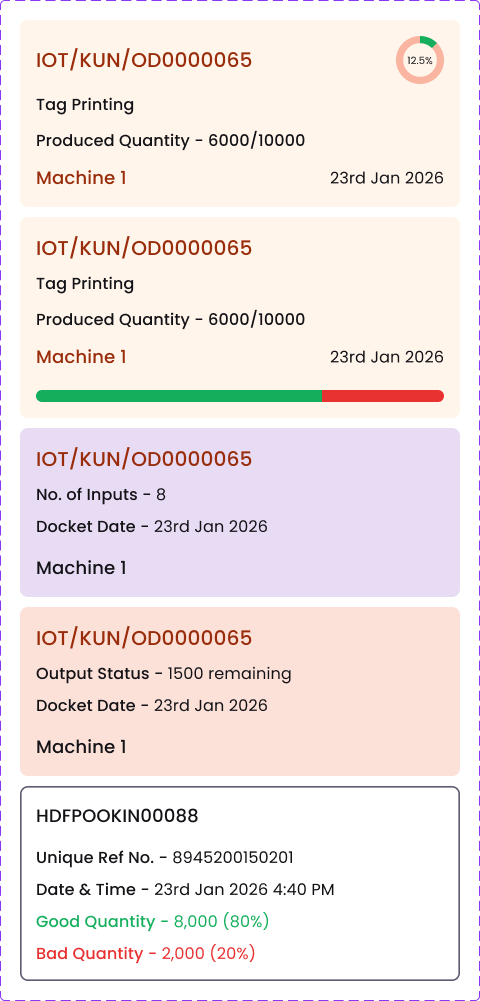
I kept red specific to conditions that deserve attention. The quality tile pairs it with the words “Bad Quantity” and a count. For a consequential material change, the first action requests the edit and a second confirmation commits it. That gives the operator time to check the reference before changing the production record.
Easy IoT · Registering stock
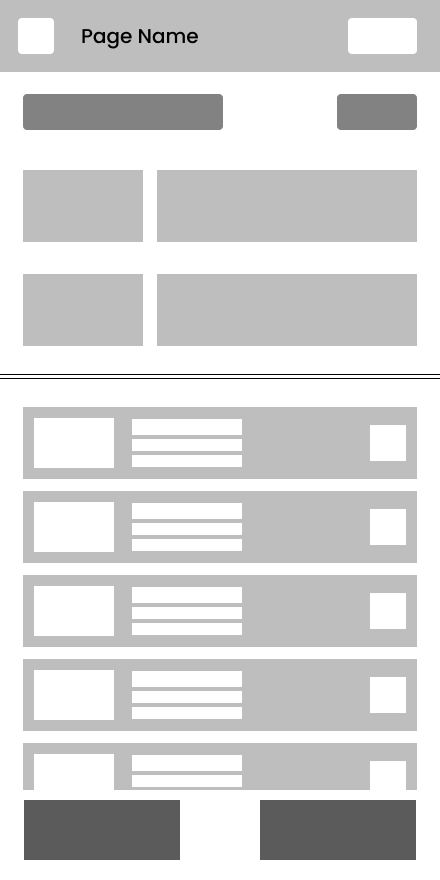
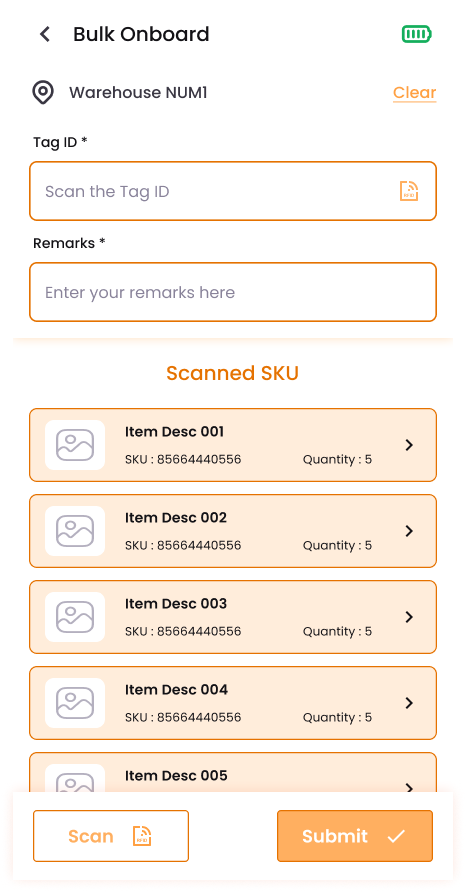
I reviewed the existing layouts against the work happening on the handheld. A worker may scan several tags before submitting a batch. The screen needs to keep the warehouse visible, show which items have already been captured and distinguish scanning the next item from submitting the entire batch.
I used a low-fidelity layout to establish that order. In the finished screen, tag entry and remarks sit above repeated SKU rows, while Scan and Submit stay together at the bottom. I carried the same task structure across Chainway and Zebra devices and adapted the layout to each display.
Easy IoT · Inward receipt
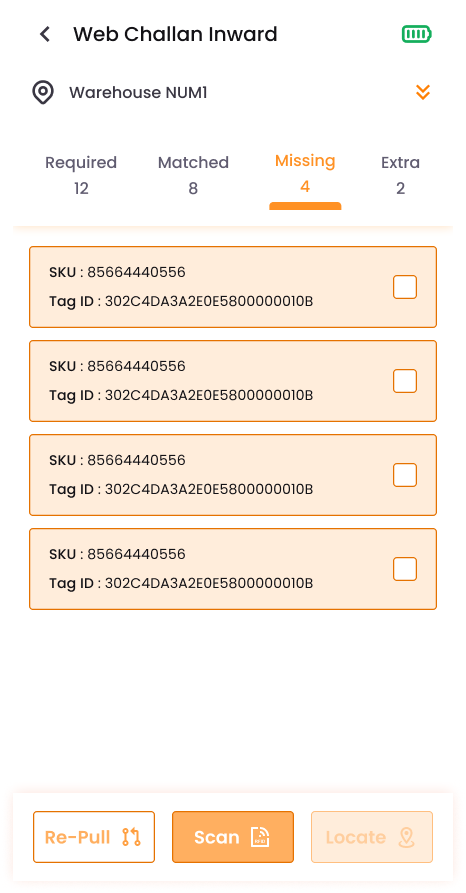
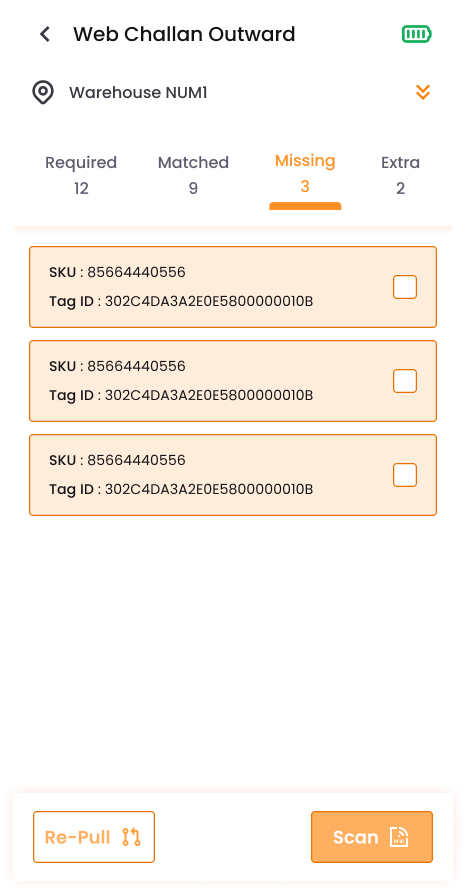
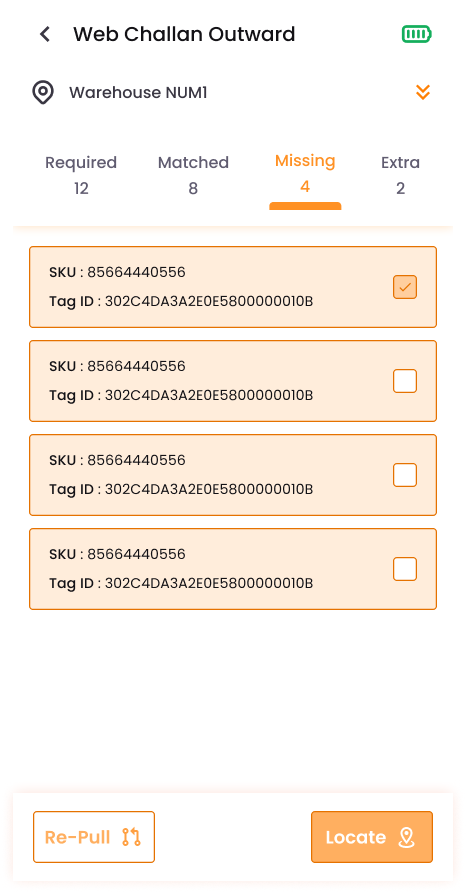
A transfer can arrive with fewer tags than expected. The worker needs to see which ones are missing while standing beside the cartons. I separated Required, Matched, Missing and Extra into counted states so the worker can open the discrepancy directly.
Easy IoT · Outward dispatch
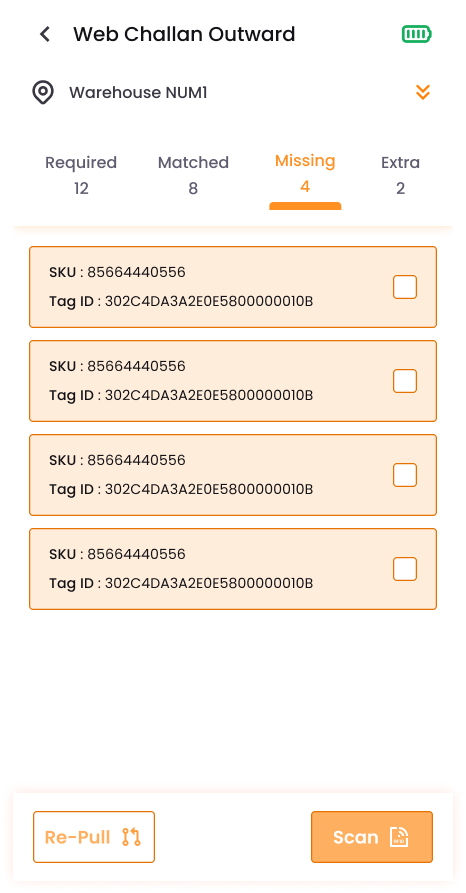
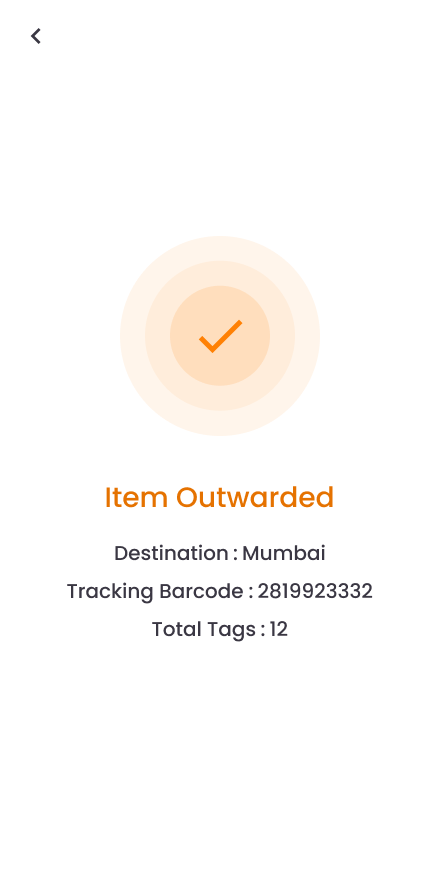
At dispatch, the question changes to “What is about to leave this warehouse?” I kept the scan list familiar and made the transfer direction explicit in the header. Selecting a missing tag makes Locate available. Once dispatch is complete, the worker needs evidence they can use at the next handoff.
PPC · Finding the right run
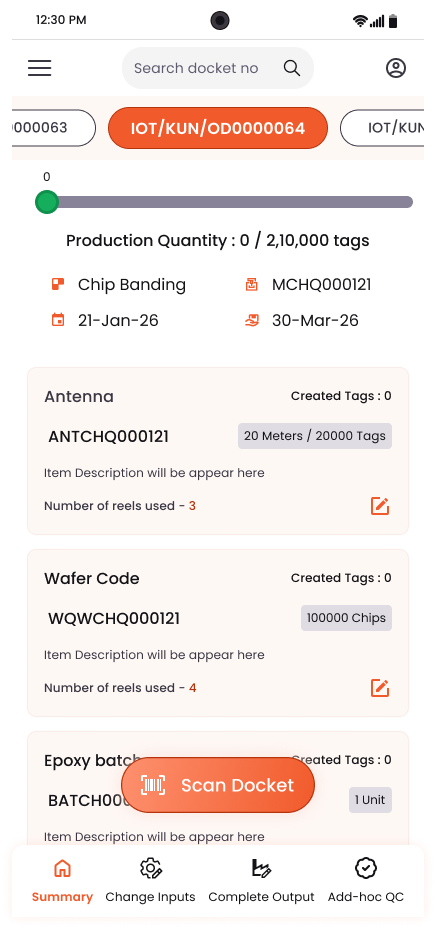
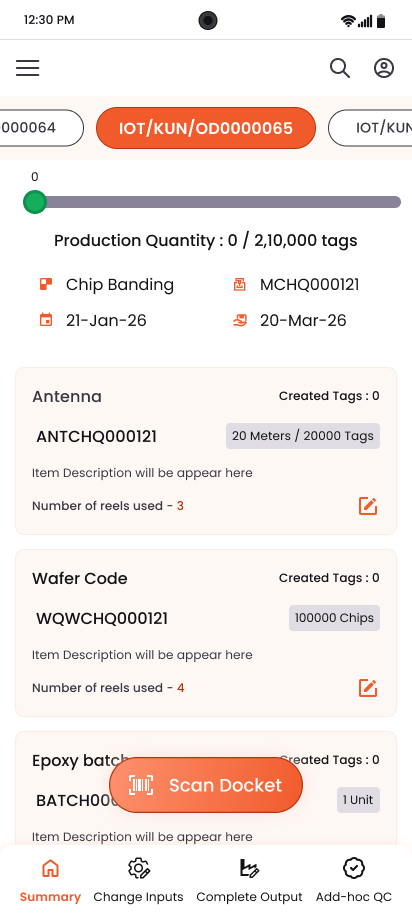
A production manager may be following several dockets at once. A docket is the job record that connects the requested quantity, machine, material batches and resulting output. I explored two iterations of the production interface, beginning with low-fidelity flows and carrying the same references through setup, active production and review.
PPC · Starting a docket
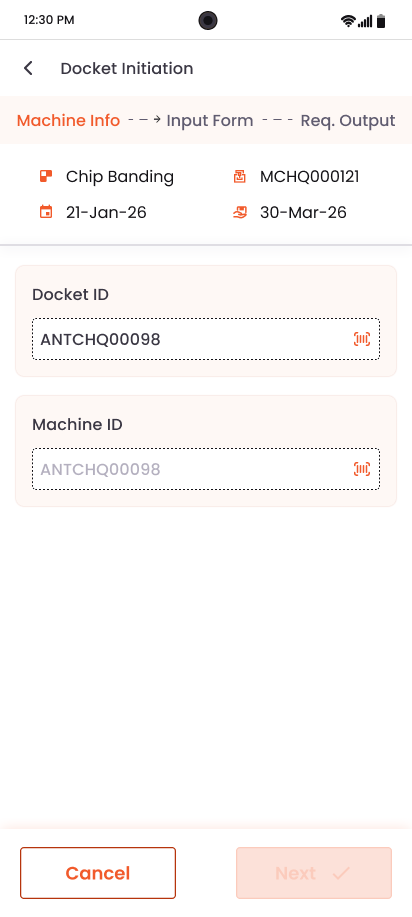
The operator first scans the docket and machine ID. A valid job on the wrong machine would still create an unreliable production record. I made machine identification a distinct step before the input form, and kept the required output visible as the next stage.
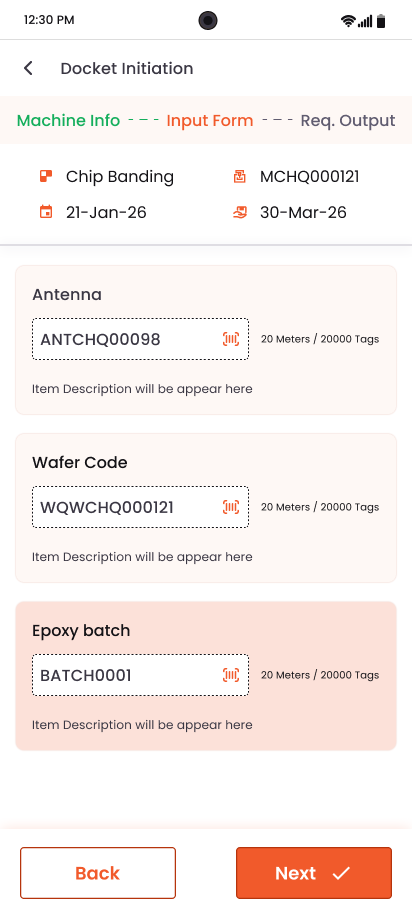
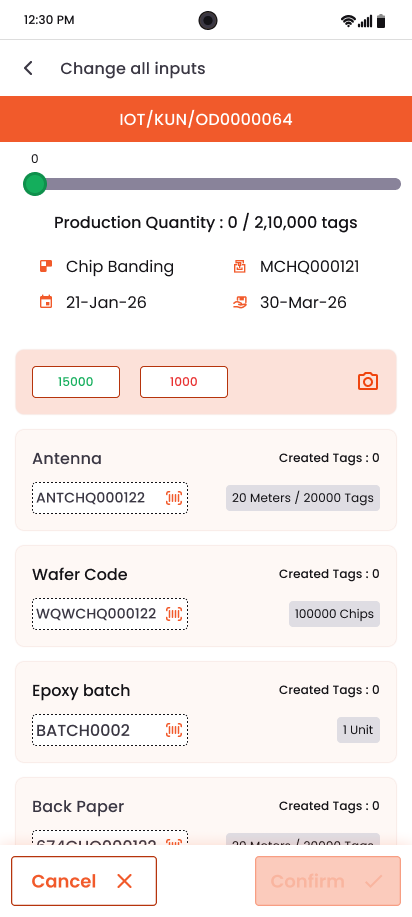
The form records the materials that will go into the run. In this chip-bonding example, the operator can see separate references for the antenna, wafer and epoxy batch. Depending on the stage, the job can also involve inlay and paper layers. Keeping a row per input lets an operator check or replace one batch without losing the others.
PPC · Changing inputs mid-run
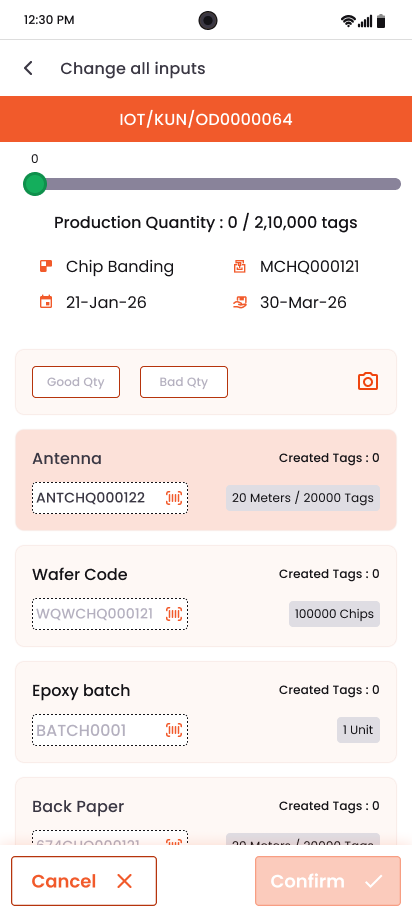
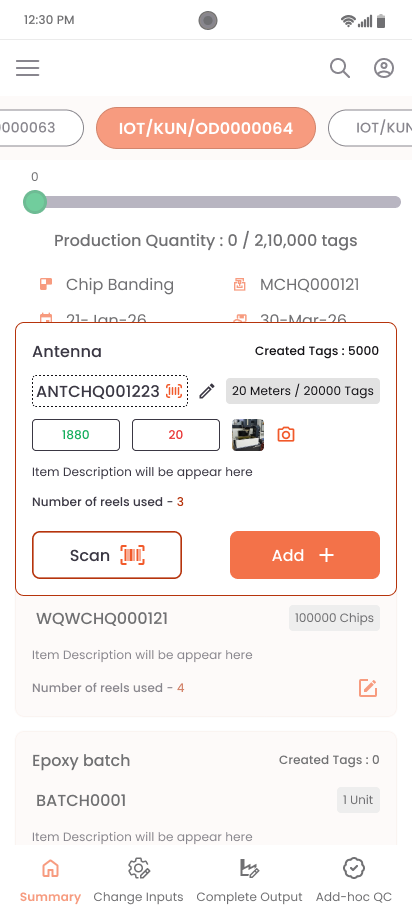
A reel can run out while the machine is still working on the same docket. If its replacement simply overwrites the old reference, a manager loses the link between earlier tags and the reel that produced them. I treated replacement as an event within the active run and kept the docket and machine context visible throughout the change.
PPC · Recording output and quality
Finishing an input batch and finishing the production job are different events. A manager needs to know how many tags have been produced against the docket target, which material supplied them and how many passed the quality check. I gave Summary, Change Inputs and Complete Output separate actions on the active docket.
For example, a reel can be exhausted while the docket still has an outstanding quantity. Recording that reel’s output before replacing it preserves the comparison between material consumed and usable tags produced. The component variants below show how target progress, outstanding output and the split between good and bad quantities can each be read from the same job record.
What I carried forward
This was one of my first professional assignments designing a system across products, and my most recent work before joining GrubPac. I delivered a color foundation, shared components, handheld warehouse flows and two PPC design iterations. What changed in my practice was how I evaluated a screen: I began with the record the next person would need, then worked back to what the operator had to see before committing an action.